LinkedIn Activity Intelligence

Stop wasting SDR time on inactive LinkedIn profiles

Upload known LinkedIn profile URLs. Minko shows who is publicly active, when they appear reachable, and what recent context your team can review — so reps spend less time researching and more time working the right accounts.

Bring known LinkedIn profile URLs through CSV, UI, API, Clay, n8n, CRM, or MCP-supported workflows. Get back structured public LinkedIn activity intelligence your team can prioritize before outreach starts.
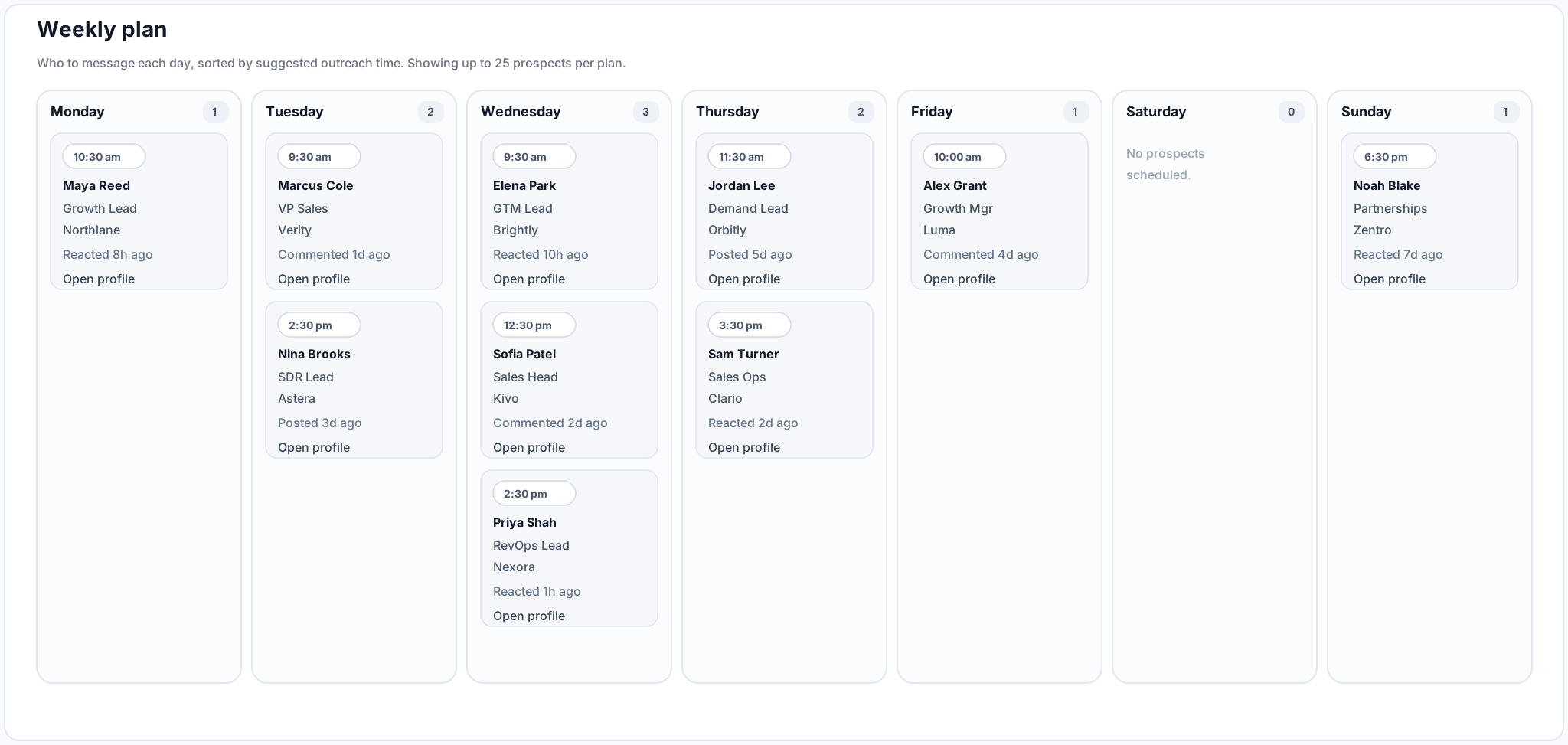
Save manual LinkedIn research time Spot active profiles faster Deprioritize inactive records Find hidden active prospects Built for known LinkedIn URLs
Prioritized outreach plan generated from known LinkedIn profile URLs with public activity signals.
The Gap

Your reps have lists. They still do the research manually.

Most outbound lists already include names, companies, titles, emails, and LinkedIn URLs. But before outreach, reps still need to check who is active, who looks inactive, what the person recently engaged with, and whether the profile is worth attention today.

  • Which profiles are active enough to prioritize?
  • Which profiles should be deprioritized for now?
  • Who is active despite having lower follower or connection counts?
  • What recent public activity gives the rep useful context?
  • When does this person appear more reachable based on observed activity?
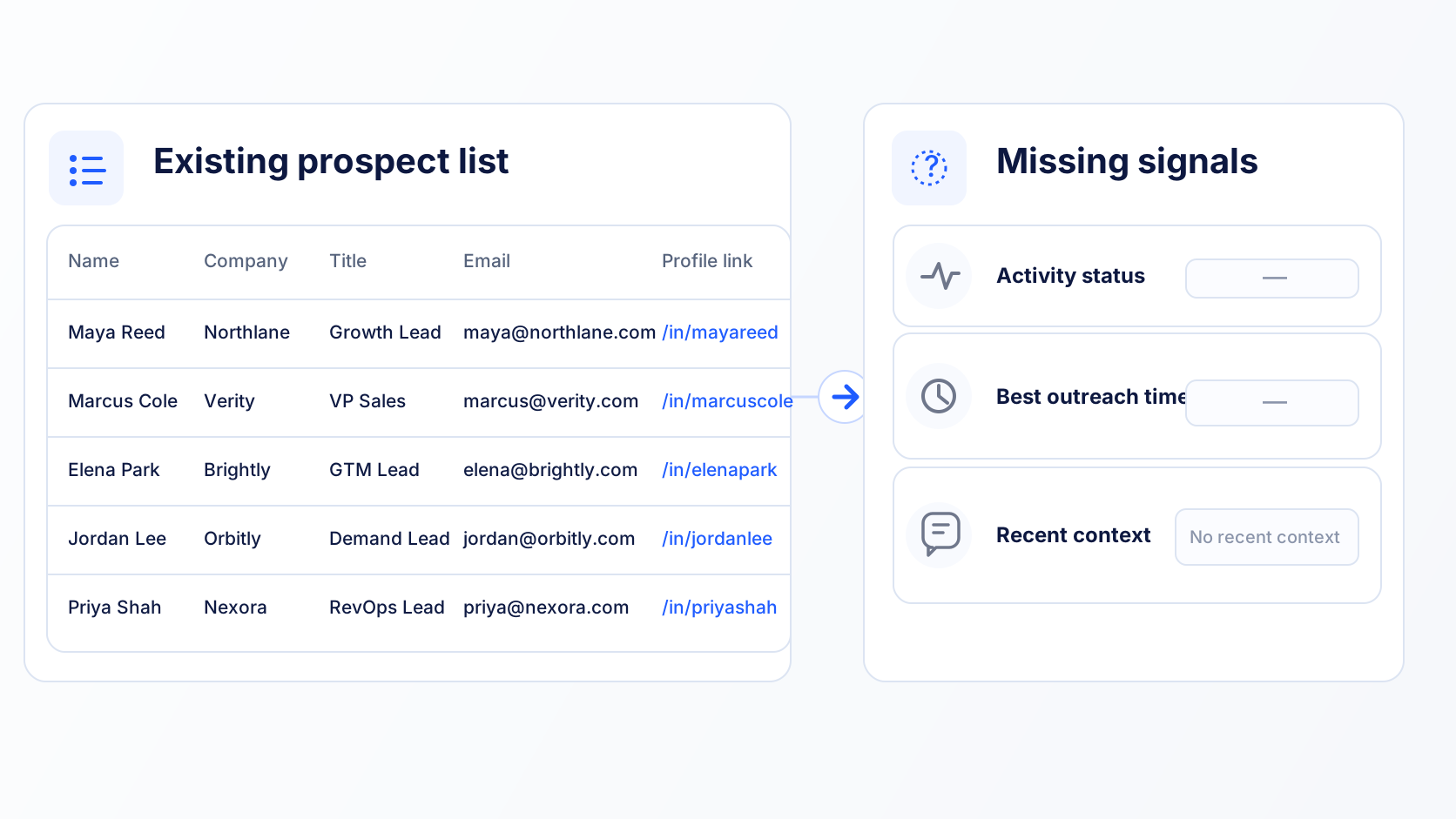
LinkedIn URL list without activity status, outreach timing, or recent public context.
Business Outcomes

Get more from the same prospect list

Minko helps teams turn known LinkedIn profile URLs into a cleaner, more actionable outreach list before reps start opening tabs, writing messages, or loading campaigns.

Save manual research time

Reps should not need to open profile after profile just to check whether someone has posted, commented, reacted, or shown recent public activity. Minko brings that activity view into a structured workflow.

Deprioritize inactive profiles

Not every LinkedIn URL deserves the same attention today. Minko helps surface low-activity or inactive profiles so teams can avoid spending equal effort on records with little recent public activity.

Find hidden active prospects

Some useful prospects may not have large follower or connection counts, but they may still be publicly active. Minko helps teams avoid overlooking people who are active but not obvious from basic profile metrics.

Generate more pipeline from the same resources

Instead of buying more lists or adding more manual research, teams can get more value from the contacts they already have by prioritizing active, context-rich profiles first.

Per-Profile Intelligence

What Minko adds to every contact

Structured public LinkedIn activity intelligence your reps can use before they send the first message.

Activity status

Understand whether a known LinkedIn profile has recent observable public activity so reps can separate active contacts from low-activity records.

Best outreach timing

See suggested days and time windows based on observed public activity patterns, helping teams plan outreach instead of guessing.

Recent context

Review recent activity themes, posts, comments, reactions, and links where available so reps can approach with relevant context.

Priority bucket

Group profiles into clear action buckets so teams know who to work first, who to review later, and who may not deserve attention right now.
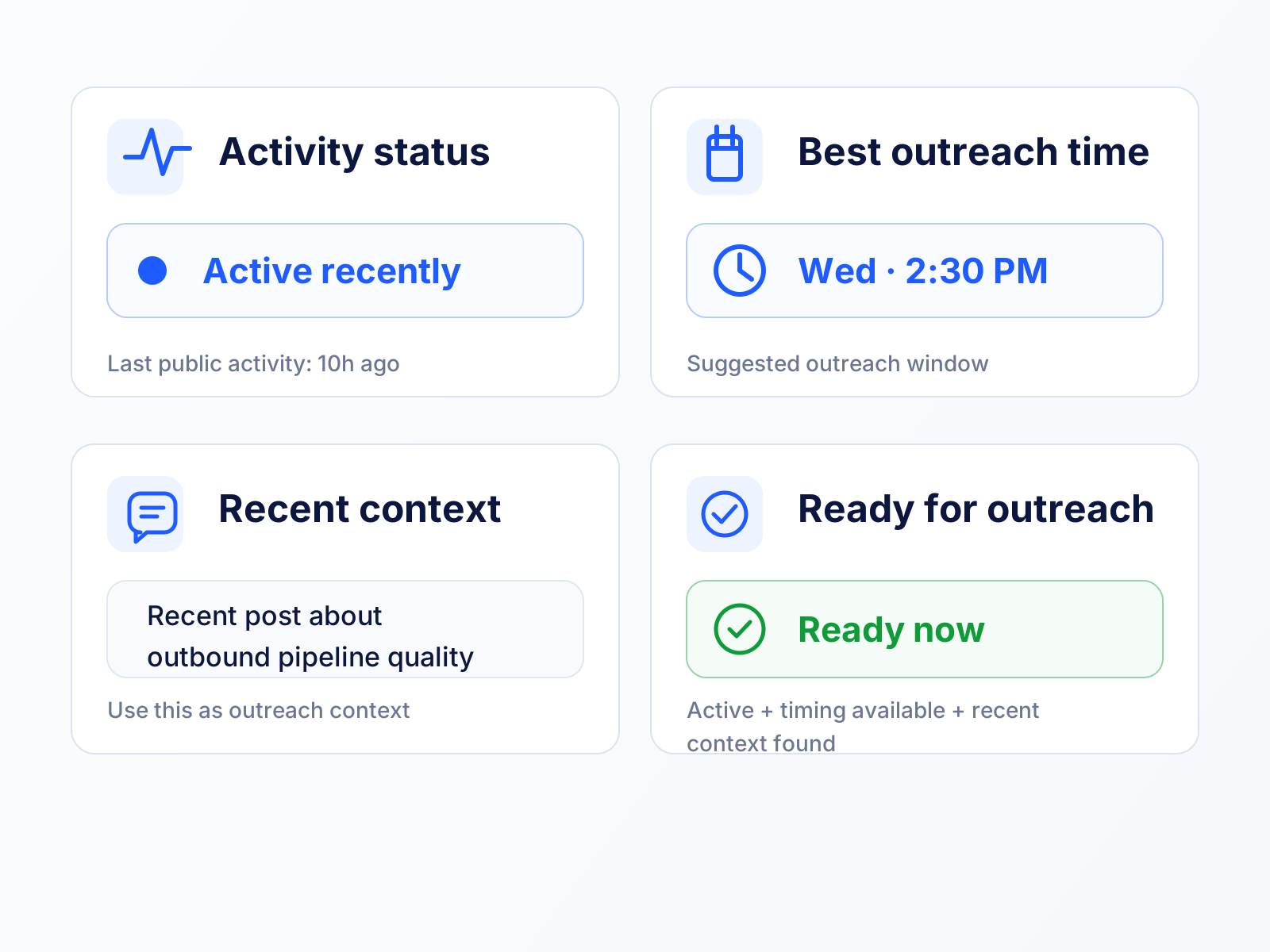
Activity status, best outreach time, recent public context, and priority bucket added to each known LinkedIn profile.
Fits Your Stack

Built for the way GTM teams already work

Upload known LinkedIn profile URLs through CSV, call the API, or run Minko inside Clay, n8n, MCP, or your CRM workflow. Minko returns structured public LinkedIn activity fields your team can route, filter, export, or sync.
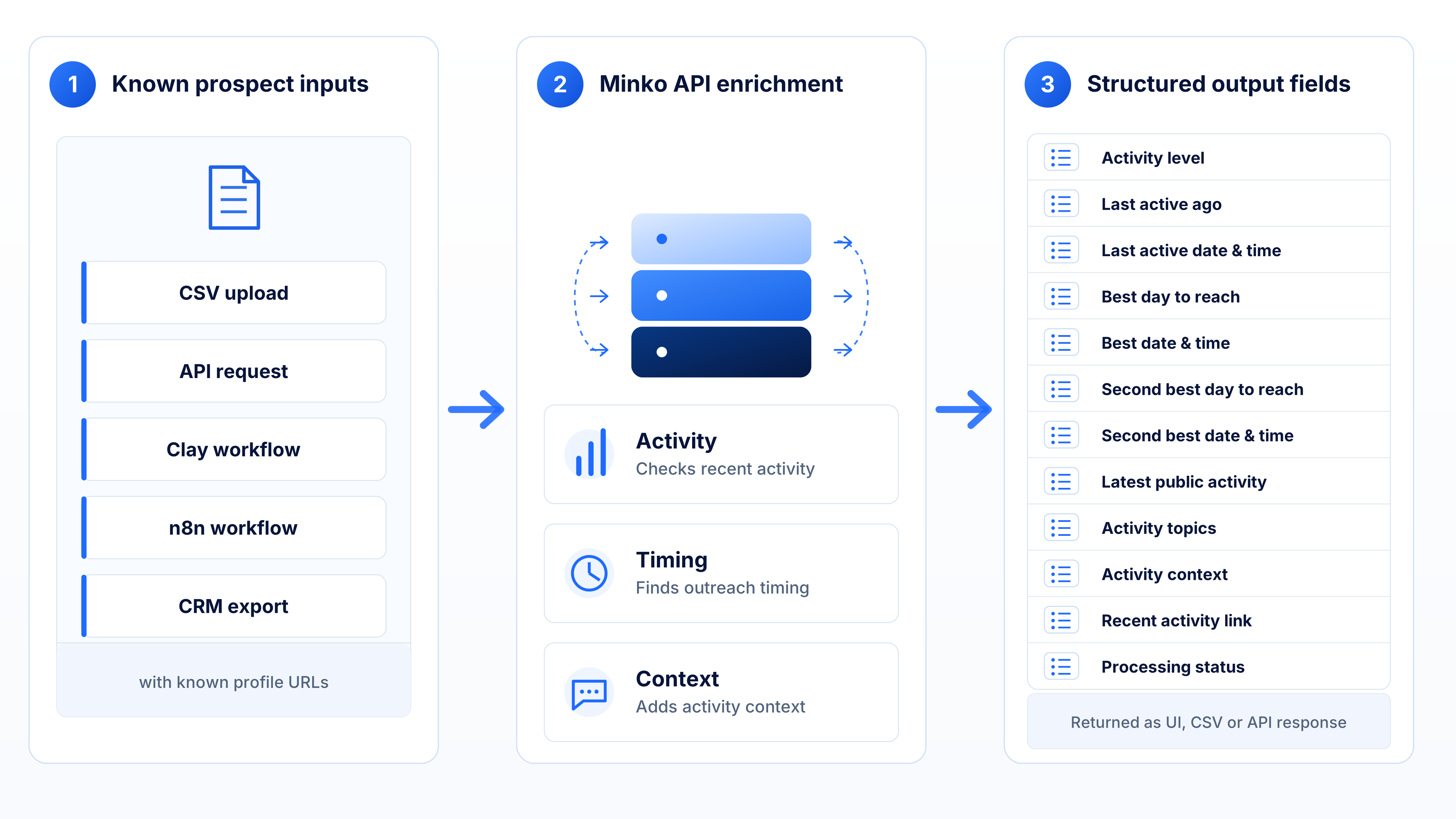
CSV upload API enrichment Clay n8n MCP CRM sync
Known LinkedIn profile URLs processed by Minko into structured public activity, timing, and context fields for CSV, API, Clay, n8n, MCP, or CRM workflows.
Before Outbound Starts

Clean up the outreach list before reps start working it

Before a campaign begins, Minko helps teams turn a flat LinkedIn URL list into a more useful outreach plan.

  • Prioritize profiles with recent public activity.
  • Deprioritize inactive or low-activity profiles.
  • Avoid missing active prospects with lower follower or connection counts.
  • Give reps recent context before they open LinkedIn.
  • Route active profiles to the right reps or workflows.
  • Export structured fields to CSV, API, Clay, n8n, CRM, or MCP workflows.
Clarifying Scope

Built for outreach timing, not lead sourcing

You bring the known LinkedIn profile URLs. Minko helps you decide which profiles are active, which ones deserve attention, and what recent public context is available before outreach.

Minko does

  • Works with known LinkedIn profile URLs
  • Checks public LinkedIn activity
  • Shows activity recency and latest activity
  • Suggests best day and time to reach
  • Helps prioritize active profiles
  • Helps deprioritize inactive or low-activity profiles
  • Returns structured fields for CSV, API, Clay, n8n, CRM, and MCP workflows

Minko does not

  • Build lead lists
  • Source candidates
  • Scrape LinkedIn or Sales Navigator search results
  • Provide buyer intent
  • Predict who is likely to buy
  • Predict job changes
  • Write automated outreach messages
  • Access private LinkedIn activity or inbox data

Ready to stop treating every LinkedIn URL the same?

Upload known LinkedIn profile URLs and get activity recency, outreach timing, and recent context your team can use before the next campaign starts.

FAQ

Questions, answered

What is Minko?
Minko turns known LinkedIn profile URLs into outreach-ready LinkedIn activity intelligence. It helps sales and recruiting teams understand who is publicly active on LinkedIn, when they appear more reachable, and what recent context to review before outreach.
What do I need to provide?
You provide known LinkedIn profile URLs. You can upload them through the UI, send them through the API, use a CSV workflow, or connect them through tools like Clay, n8n, or MCP-supported workflows.
What does Minko return?
Minko returns structured LinkedIn activity intelligence such as activity level, last active timing, best day and time to reach, latest public activity, activity topics, activity context, recent activity links, and processing status where relevant.
What does “last active” mean?
“Last active” is inferred from publicly visible LinkedIn activity such as posts, comments, and reactions. It does not mean login status, private activity, inbox activity, or a guarantee that the person saw your message.
How does Minko decide the best day and time to reach someone?
Minko looks at observed public LinkedIn activity patterns and returns timing fields that may help reps or recruiters plan outreach. It is a timing signal based on public activity, not a guarantee of response.
Can I see the actual recent activity?
Yes. Minko can return recent LinkedIn activity context, including public posts, comments, reactions, activity topics, and recent activity links where available. Through MCP, connected tools and agents can also work with recent activity data.
Is Minko a list-building tool?
No. You bring the LinkedIn profile URLs. Minko enriches those known profiles with LinkedIn activity intelligence. It does not discover prospects, source candidates, scrape search results, or build lead lists.
Does Minko provide buyer intent or job-change predictions?
No. Minko does not provide buyer intent, funding triggers, job-change predictions, or “likely to buy” scores. It focuses on public LinkedIn activity recency, timing, and context.
Does Minko write the outreach message for me?
No. Minko does not write automated outreach messages. It gives reps and recruiters recent activity context so they can make better decisions and write more relevant outreach themselves.
What happens if a profile has no recent public activity?
Minko will reflect that in the output. Some profiles may show low activity, old activity, limited public activity, or processing issues. Where relevant, the export includes status and issue fields so users know what happened.
Are duplicate records a problem?
No. Duplicate LinkedIn profile URLs can be merged or handled so users are not reviewing the same profile repeatedly.
How does Minko help save rep time?
Minko reduces the manual work of checking LinkedIn profiles one by one. It structures public activity recency, timing, recent context, and processing status so reps can review and prioritize faster before outreach.
Can Minko help me avoid inactive profiles?
Yes. Minko reflects whether a known LinkedIn profile has recent observable public activity. Teams can use this to deprioritize inactive or low-activity profiles instead of treating every record equally.
Does Minko only prioritize people with high follower counts?
No. Follower and connection counts can be useful context, but they are not the only signal. Minko focuses on public activity recency and context, which can help surface active profiles that may not look obvious from basic profile metrics alone.
Will Minko guarantee more pipeline?
No tool can guarantee pipeline. Minko helps teams improve outreach preparation by identifying active profiles, timing outreach better, and giving reps recent context before they reach out.
How do I get started?
Book a demo to walk through the workflow, or create an account to start enriching known LinkedIn profile URLs with activity timing and context.